


Strip away the hype and an AI agent is a while loop. Read the context. Decide what to do. Act. Check if you’re done. Repeat.
That’s it. That’s the entire thing.

The hard part was never the loop. It’s everything around it — what context to feed in, when to stop, how to keep quality from collapsing at 100K tokens, what to do when the agent confidently produces garbage. 72% of enterprises are testing agents right now (Deloitte, 2026). Only 11% have them in production. That gap isn’t model intelligence. It’s architecture.
This article covers the architectural patterns that close that gap. Not theory. Not framework comparisons that’ll be outdated next quarter. Patterns you can use this week, with templates you can copy-paste today.
The Loop (and the Five Ways It Breaks)
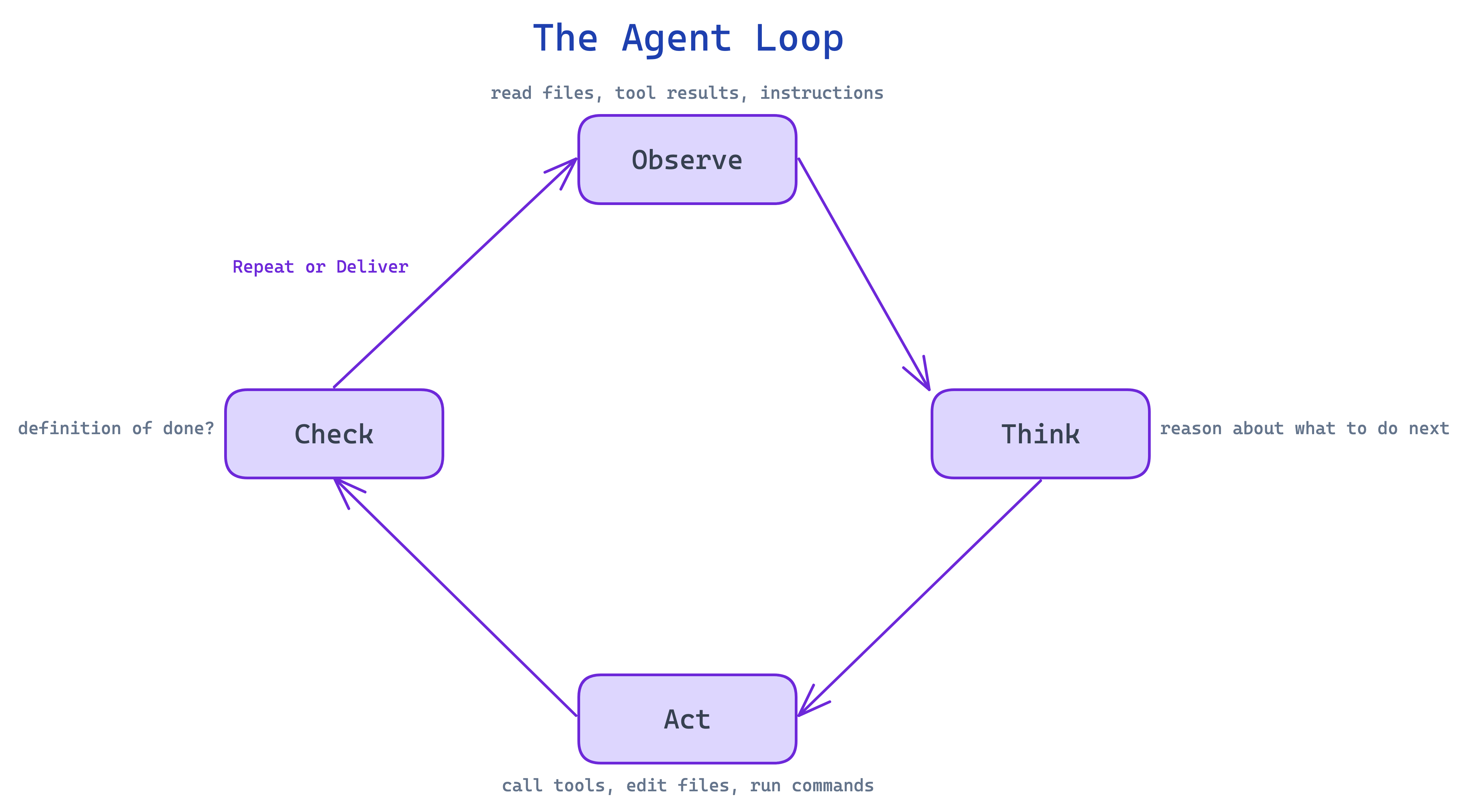
Every agent runs the same cycle: Observe (read files, tool results, instructions) → Think (reason about what to do next) → Act (call tools, edit files, run commands) → Check (did I hit the definition of done?) → repeat or deliver.
That’s every agent ever built. Claude Code, Codex, Gemini — they all run this loop. The platform doesn’t matter much. Pick whichever feels right and start building. The differences are single-digit percentages that reset with every model generation.
What matters is how the loop breaks. And it breaks in five specific ways:
1. Hallucination from missing context. The agent doesn’t have the information it needs, so it fills the gap with confident fiction. You asked for a login page and it invented an auth library that doesn’t exist.
2. State loss in long workflows. At 10K tokens, the agent is sharp. At 150K, it forgets you wanted dark mode and rebuilds the entire UI in blinding white. Three times.
3. Tool misuse. Wrong tool, bad parameters, or just ignoring the output entirely. The agent has access to 15 tools and picks the worst one for the job.
4. Unproductive loops. Same failed approach, over and over. Burning tokens with zero progress. The agent version of pulling a door that says “push.”
5. Silent failure at scale. Here’s the math nobody mentions: if your agent is 95% accurate per decision and makes 20 decisions per task, it fails more often than it succeeds. Small inaccuracies compound. At production scale, 95% isn’t good enough.
Every pattern in this article fixes one or more of these failures. The loop is simple. The architecture around it is what earns the word “engineering.”
Self-Modifying Instructions
This is the highest-ROI pattern in practice, and the one I’d set up before anything else.
When the agent makes a mistake and you correct it, the agent writes that correction as a permanent rule in its instruction file. Not just for this conversation — forever.
First session: wrong guesses everywhere. Dark mode when you wanted light. Semicolons when your codebase doesn’t use them. Verbose comments when you wanted none.
Second session: fewer mistakes. The corrections from last time are already loaded.
Fifth session: near-zero preference errors. The agent knows your style.
Drop this into your workspace as claude.md, gemini.md, or agents.md:
# Agent Instructions

Read this file before every task. It contains rules that improve over time.

## How This Works

When the user corrects you or you make a mistake:
1. Append a new rule to the Learned Rules section below
2. Number it sequentially
3. Write it as a clear imperative

**Format:** [Category] — Never/Always [do X] because [Y].

**Add a rule when:**
- User explicitly corrects your output
- User rejects an approach or pattern
- A bug was caused by a wrong assumption
- User states a preference

## Learned Rules

(Rules accumulate here automatically)
Every major platform supports this. The file loads into context at the start of every conversation. Over time, the agent becomes personalized to exactly how you work.
Why it works: LLMs are stateless. They don’t remember previous conversations. But files persist on disk. By writing corrections to a file, you’re giving the LLM a form of persistent memory it wouldn’t otherwise have. Write down what went wrong so you don’t repeat it.
The honest caveat. Improvement plateaus. Past roughly 30 rules, the file gets long enough that instructions start competing with each other. When that happens, prune — delete rules that are now obvious, merge similar ones, keep only the corrections that still cause errors when forgotten. Treat it like any config file: maintain it or it rots.
Prompt Contracts
Vague tasks are the single biggest reason people give up on agents. “Build me a landing page.” What kind? What style? What content? Should it be responsive? Where does it deploy? What counts as done?
Without answers, the agent guesses. You get something you didn’t want. You blame the AI. The real problem was the missing spec.
Before any non-trivial task, force the agent to write a contract. Save this as a skill file:
---
name: prompt-contract
description: Define scope before starting work
---

Before implementing any non-trivial task:

1. Analyze the request — stated requirements, implicit assumptions, decision points
2. Write a 4-section contract:
   - **Goal:** What "done" looks like in one sentence
   - **Constraints:** Tech limits, style rules, scope boundaries
   - **Output:** Exactly what the deliverable looks like
   - **Failure:** What counts as a failed result
3. Show the contract to the user
4. Only proceed after explicit approval
You can push it further: have the agent ask 5 clarifying questions before writing the contract. “Single-page or multi-page?” “Minimal design or information-dense?” “Real copy or placeholders?” These questions surface assumptions you didn’t know you had. The kind that would’ve turned into wrong guesses.
This fixes failure mode #1 (hallucination from missing context) at the source. Upfront alignment beats after-the-fact correction every time.
When Single Agents Aren’t Enough
Everything above works with one agent. And honestly, most tasks only need one agent. Multi-agent patterns get hyped far beyond their actual utility. A single well-prompted agent beats a clumsy multi-agent system almost every time.
But there are specific situations where one agent genuinely hits a ceiling. Here’s when to reach for more.
Verification Loops
An LLM that just spent 200,000 tokens building your app has a blind spot. Not emotional sunk-cost bias — but an architectural one. Its entire context is saturated with its own reasoning, its dead ends, its tradeoffs. Ask it “can you improve this?” and the answer is almost always no. It can’t see what it can’t see.
Pass only the output — not the conversation, not the chain of thought — to a fresh agent with zero context. The reviewer sees the code like a stranger.
Three roles, each starting clean:
Builder — creates the first version
Reviewer — evaluates only the output. Bugs? Edge cases? Simpler approaches?
Fixer — takes the reviewer’s notes and addresses them
This is peer review for LLMs. A reviewer with fresh context will catch issues that the builder structurally cannot see — because the builder’s context window is full of its own justifications.
Use when: any build over 100K tokens. The cost of a fresh reviewer is tiny compared to shipping bugs the builder couldn’t spot.
Stochastic Consensus
This one surprised me. Ask an LLM “give me 3 marketing strategies.” You get ideas A, B, C. Same prompt, same model, ask again: A, B, D. Again: B, C, E. Temperature means each run explores a slightly different slice of the possibility space.
Stochastic consensus makes this deliberate. Spawn 10 agents with different prompt framings:
“Analyze conservatively”
“Assume a limited budget”
“Think from the end user’s perspective”
“Prioritize shipping speed”
“Challenge every assumption”
Each produces answers independently. Then you categorize:
Consensus (7+ agents agree) = high-confidence moves
Split (4-6 agents) = worth investigating further
Outliers (1-2 agents) = potential breakthroughs or hallucinations
You’re trading a few dollars per run for search breadth. Sampling from the distribution instead of accepting the first draw.
Worth it for: strategic decisions, naming, positioning, anything where you want to explore the full space before committing. Overkill for: anything with a clear correct answer.
Agent Debates
Consensus gives you breadth — the average of many perspectives. Debates give you depth — what survives friction.
Assign agents different roles: systems thinker, pragmatist, edge-case finder, contrarian. They argue in a shared file, reading each other’s responses before writing.
In a content strategy analysis, consensus agents recommended “reformat your hooks for the platform.” Debating agents went deeper: “Hook reformatting is necessary but insufficient. The real issue is content-platform mismatch — content designed for one algorithm systematically fails another’s cold-start distribution.”
Same question. The debate found the actual problem. Consensus found the obvious answer.
Use for: complex analysis where nuance matters more than speed. Skip for: anything time-sensitive — debates take multiple rounds and burn tokens.
Three multi-agent patterns. Three specific use cases. For everything else, a single agent with a good prompt contract is the right answer. Don’t add complexity for its own sake.
Context Windows and Why Your Agent Gets Worse Over Time
LLM output quality degrades as context fills. This isn’t a bug. It’s a property of how transformer attention works. Sharp at 10K tokens. Noticeably worse at 150K on the same tasks.
Think of context management like packing for a backpacking trip. You could bring your entire wardrobe. You’d move slowly and nothing would be easy to find. Pack light instead. Know where to resupply.
In context (what you carry): system prompt, instruction files, skill headers, the current task.
On disk (available when needed): full file contents, web search results, codebase, git history. The agent loads these on demand through tools.
In practice, you’ll find that system prompts, MCP tool definitions, and memory files can eat 8-9K tokens before you’ve typed a word. That’s context space not available for reasoning. Audit regularly. Trim what you can.
Compaction happens when the context hits its limit. The platform summarizes your conversation to free space. It works, but details get lost. Early decisions compress. Tool outputs disappear. Don’t let it surprise you — manage context proactively so the agent doesn’t lose important state at the worst moment.
Measuring What Matters
You need four numbers:
Task completion rate — did the agent finish?
Token spend per task — getting more expensive?
Tool call success rate — tools being used correctly?
Error type — which of the five failure modes hits you most?
LangSmith, LangFuse, and Helicone handle tracing. Ragas and DeepEval handle quality scoring. Start simpler: just log tool calls and track whether tasks complete. That alone reveals patterns you’d never spot otherwise.
What Agents Actually Cost
Nobody publishes this part. Agents burn tokens fast.
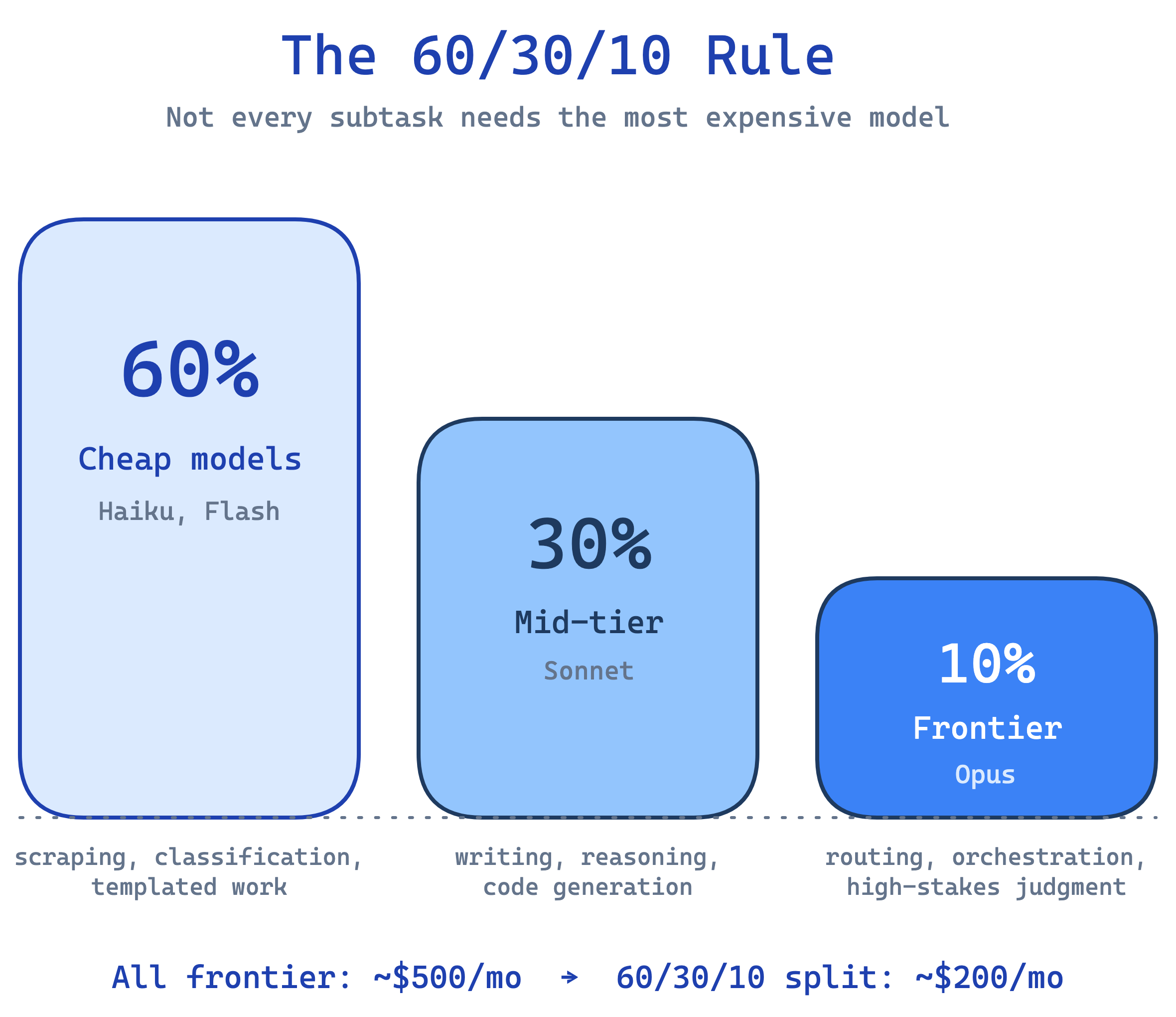
The 60/30/10 Rule
Not every subtask needs the most expensive model:
60% of tokens → cheap models (Haiku, Flash). Scraping, classification, templated work.
30% → mid-tier (Sonnet). Writing, reasoning, code generation.
10% → frontier (Opus). Routing decisions, complex orchestration, high-stakes judgment.
Approximate math on 100 million tokens per month:
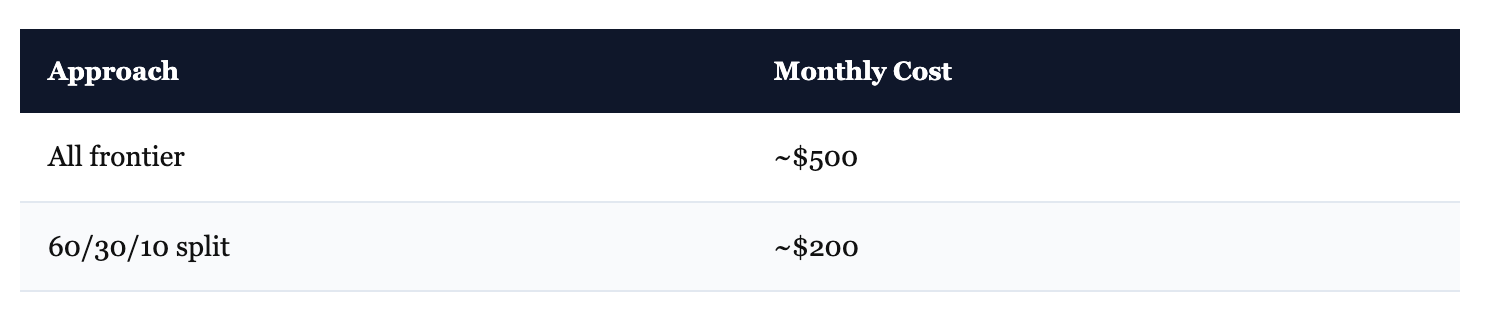
Same work. Roughly 60% cheaper. Token prices shift quarterly — check current rates — but the principle holds: most subtasks don’t need frontier-level reasoning.
A Real Pipeline
What a lead generation pipeline looks like in practice:
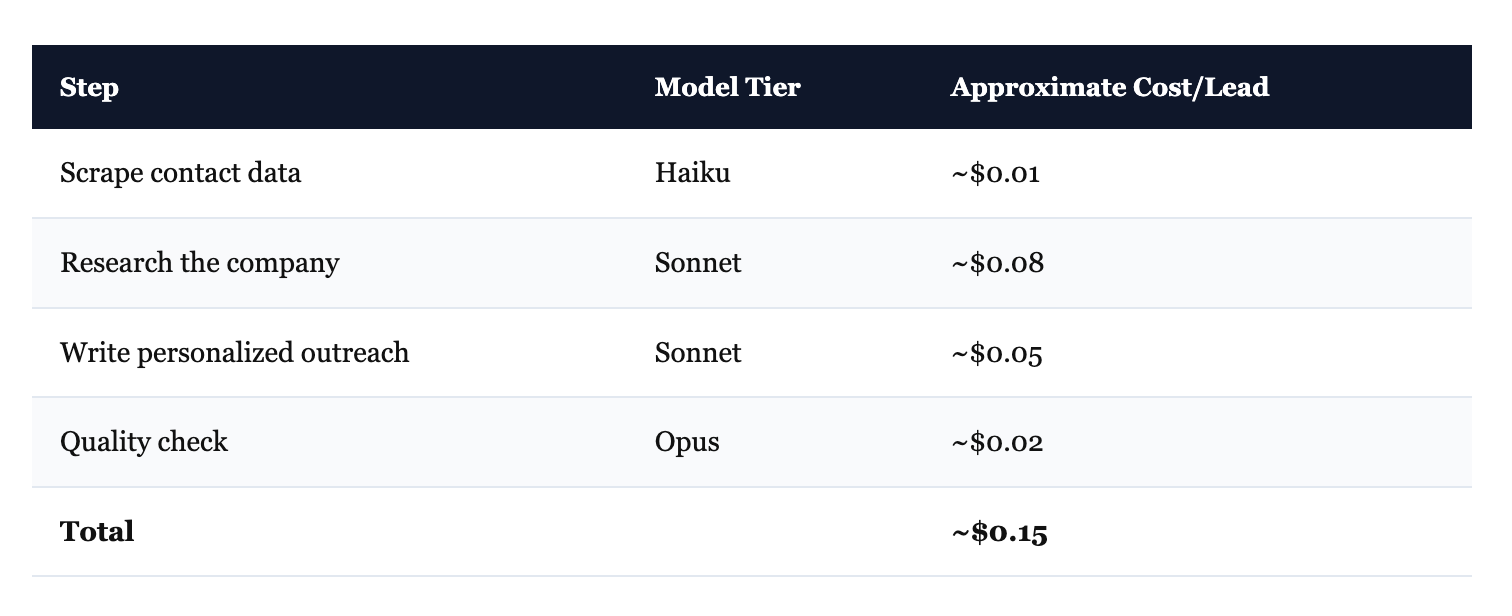
At 1,000 leads/day: roughly $120/month. Same pipeline with only frontier models: roughly $450/month. The scraping step doesn’t need sophisticated reasoning. The quality check does. Route accordingly.
Every major provider also offers batch APIs — submit jobs in bulk, wait 24 hours, get results at roughly half price. Worth it for anything that isn’t time-sensitive.
When NOT to Use Agents
Most agent guides won’t say this: the majority of tasks don’t need agents.
If the task has clear logic — a known input, a defined transformation, a predictable output — a Python script is faster, cheaper, more reliable, and actually debuggable. Every loop iteration through an LLM introduces a chance of hallucination. Why add that risk when the task doesn’t require reasoning?
An HN practitioner put it perfectly: “For every example-agent they gave, an ordinary ‘dumb’ service would’ve sufficed.”
Use agents when:
The task needs reasoning about ambiguous or varied inputs
The steps aren’t known in advance — the agent decides what to do next
The work requires natural language understanding (code review, research synthesis, writing)
Use a script when:
The logic is expressible as if/else or a loop over structured data
Reliability matters more than flexibility
The work is pure transformation — ETL, reformatting, filtering
95% of enterprise AI pilots fail before production (Deloitte, 2026). Many of those failures weren’t because the agent was bad. The task never needed an agent in the first place.
Start Here
Copy the self-modifying instruction template into your workspace. Use it for five sessions. Watch the errors drop.
Save the prompt contract skill file. Use it before your next non-trivial build.
Then pick one real task — something you do regularly that involves ambiguous inputs and multiple steps — and hand it to an agent with a clear definition of done.
One template. One skill file. One real task. The patterns scale from there.