


Claude Code wins 67% of blind coding tests against Codex.
It also makes developers 19% slower.
That’s from two separate studies — a DEV Community analysis of 36 blind rounds, and METR research tracking actual task completion times. The better code came from Claude. The faster workflow came from Codex. And that tension runs through every feature, every pricing decision, and every architectural choice these two tools have made.
Most comparison articles list specs and pick a winner. This one doesn’t. I went through the official changelogs, developer docs, and release notes for both tools as of March 2026. What follows is a feature-by-feature breakdown — what each tool actually does, where it’s ahead, where it’s behind, and what’s still missing.
The Foundation: Models, Context, Pricing
Before the feature comparison, the facts that most articles get wrong.
Models. Claude Code defaults to Opus 4.6. Codex defaults to GPT-5.4. Both are frontier models. Codex also offers GPT-5.3-Codex-Spark for Pro subscribers. Claude Code lets you switch to Sonnet 4.6 (faster, cheaper) or Haiku (fastest). Both support mid-session model switching via /model.
Context window. This is where most comparisons are outdated. As of March 13, 2026, Claude Code has a 1M token context window for Opus 4.6 — generally available on Max, Team, and Enterprise plans. No beta header, no special config. Codex’s context window varies by model and configuration — reported between 400K and 1M tokens depending on the source. Either way, the old “Codex has 5x the context” talking point is dead. Claude Code has closed the gap or pulled ahead.
Pricing. This is where things diverge hard.
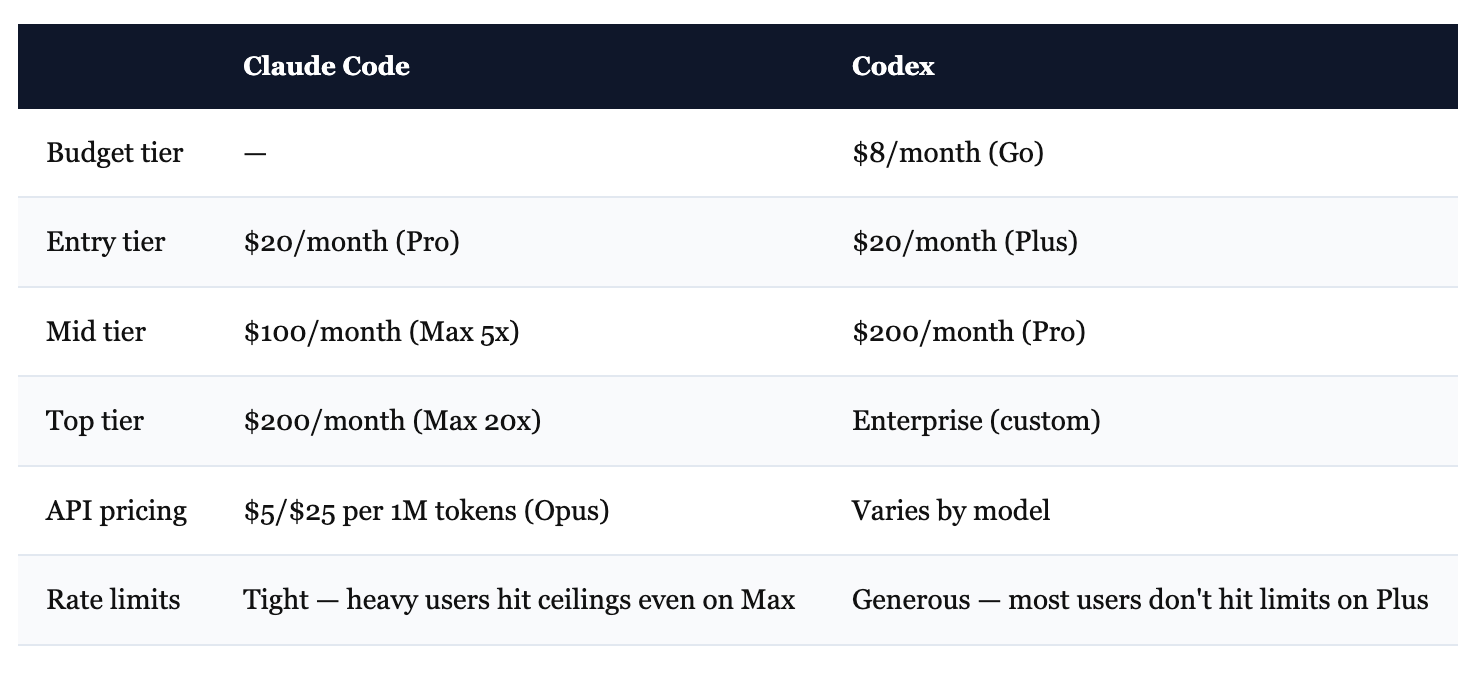
The sticker prices look similar. The experience isn’t. Claude Code users on the $20/month Pro plan report that two complex Opus prompts can exhaust their weekly allowance. Codex on the $20/month Plus plan feels effectively unlimited for most workflows. Even on Claude Code’s $200/month Max tier, intensive sessions regularly trigger rate limits.
This isn’t a minor annoyance. METR’s finding — 19% slower task completion — traces directly to this. Developers get stopped mid-thought, lose context, and have to restart.
Claude Code also consumes roughly 4x more tokens per task than Codex. In one documented test: 6.2M tokens for Claude vs 1.5M for Codex on the same Figma-style project. Claude’s reasoning-as-it-goes approach produces better results. It also burns through limits faster.
Honest summary: Codex gives you more output per dollar. Claude Code gives you better output per task. Both things are true.
Agent System
This is where the tools differ most, and where the real architectural bet shows.
Claude Code: Agent Teams. Launched February 5, 2026 alongside Opus 4.6. Multiple independent Claude sessions that coordinate, message each other, and divide work in parallel. Each agent gets its own context window and works in an isolated git worktree. They share a task list with dependency tracking — Agent A can block on Agent B’s work. There’s direct inter-agent messaging and broadcast.
You configure agents with markdown files (YAML frontmatter for settings, body for system prompt). Each can have its own model, effort level, tools, hooks, MCP servers, and even persistent memory. You can restrict which agents can spawn other agents. Background agents run concurrently while you keep working. Kill all background agents with Ctrl+F.
This is the most sophisticated multi-agent system in any coding tool right now. It’s also in research preview, requires an environment flag to enable, and consumes tokens fast.
Codex: Cloud Sandboxes + Parallel Threads. Different philosophy entirely. Instead of agents talking to each other, Codex runs independent tasks in isolated cloud containers. You launch work with codex cloud, optionally targeting specific environments. Tasks execute in the background — with internet disabled for security — while you do other things.
Up to 6 concurrent threads by default (configurable). Each task is independent — no inter-agent messaging, no shared task lists. But that simplicity is the point. You fire off 4 tasks, switch to Slack, come back to 4 completed results. The --attempts flag (1-4) even lets you generate multiple solutions and pick the best one.
Codex also has local subagents (configured via TOML files in ~/.codex/agents/), plus an experimental spawn_agents_on_csv tool that processes batches by spawning one agent per row.
Who wins: Depends on what you need. Claude Code’s agent teams are more powerful — coordination, messaging, dependency tracking. Codex’s cloud execution is more practical for many workflows — fire and forget, no local resource drain. If you need agents that talk to each other, Claude Code. If you need tasks that run in the background while you do other work, Codex.
Configuration & Governance
Claude Code has the deeper system. CLAUDE.md files for project context (layered: project → user → global). 17+ hook lifecycle events — SessionStart, PreToolUse, PostToolUse, SubagentStart, WorktreeCreate, and more. Hooks can be shell commands or HTTP POST endpoints. You can block dangerous operations, enforce formatting, run validation, trigger external systems. There’s a full permissions system with modes (acceptEdits, plan, ask, deny, bypassPermissions) and managed enterprise settings via Windows Registry or macOS plist.
Skills let you define reusable workflows as markdown files with frontmatter. Agent definitions support per-agent hooks, MCP servers, memory scope, effort levels, and tool restrictions. The configuration surface is enormous.
Codex uses AGENTS.md and config.toml. Simpler, but with one critical advantage: stricter instruction following. Multiple developers on HN reported that Codex follows AGENTS.md “down to the last character,” while Claude Code interprets CLAUDE.md more freely. Codex’s hook system is newer (SessionStart, Stop, userpromptsubmit) but less mature — fewer events, less granular control. Permission profiles offer filesystem/network sandbox policies. Approval modes (Auto, Read-only, Full Access) are straightforward.
Who wins: Claude Code, clearly. The hook system alone — 17 events vs 3 — gives you dramatically more control. But Codex’s stricter instruction adherence partially offsets this. If you need enterprise governance with audit trails, Claude Code. If you just need the AI to follow your project rules exactly, Codex has a surprisingly strong case.
Voice Mode
Both shipped push-to-talk voice input within days of each other in early March 2026.
Claude Code: Hold spacebar, speak, release. 20 supported languages including Russian, Ukrainian, Polish, Turkish, Korean, Japanese, Chinese. Works on macOS, Linux, and Windows. Custom keybindings — you can remap to any modifier+key combo. Optimized for technical terms and repo names. Voice STT is included at no extra cost for all subscription tiers.
Codex: Same spacebar mechanic, powered by the Wispr Flow engine. High accuracy for technical terms (async/await, React hook, SQL join). Transcription tokens are free. But only runs on macOS and Windows — no Linux support. Must be manually enabled via features.voice_transcription = true in config.
Who wins: Claude Code. Same interaction model, but works on Linux, supports more languages, and enables by default. If you’re on macOS or Windows and only need English, they’re effectively equal.
Remote & Cloud
These tools took opposite approaches to “work from anywhere.”
Claude Code: Remote Control. Scan a QR code or use /remote-control to bridge your terminal session to claude.ai/code. Continue the conversation from your phone, tablet, or any browser. The AI keeps running on your local machine — you’re just controlling it remotely. Available for Max subscribers. No separate setup, no cloud infrastructure. Permission prompts relay to your mobile device.
Everything executes locally. Your code never leaves your machine.
Codex: Cloud Execution. Tasks run in OpenAI’s cloud containers. Internet disabled by default for security. You can launch work from the CLI, the desktop app, the IDE extension, or by tagging @codex on GitHub issues and PRs. Results come back as diffs or pull requests.
Your code IS on their infrastructure during execution. The tradeoff: you get parallelism and background work without using local compute.
Who wins: Different tradeoffs, hard to compare directly. Claude Code gives you remote access to your local setup — better for security-sensitive work. Codex gives you actual cloud compute — better for parallelism and async workflows. If you care about code staying on your machine, Claude Code. If you want to fire off 6 tasks and close your laptop, Codex.
IDE & Desktop Experience
Claude Code runs primarily in the terminal with a VS Code extension for IDE integration. The VS Code extension is solid — full chat panel, session management, plan markdown viewing with commenting, plugin management, MCP management, session bridging. No standalone desktop app. Rating: 4.0/5 on the VS Code Marketplace.
Codex has both a CLI and a native desktop app (macOS since February 2, Windows since March 4, 2026). The app is a real standalone environment: manage multiple agent threads in parallel, review diffs, comment inline, stage/revert chunks, commit — all without leaving the app. Built-in terminal per thread. Git worktree support for isolating changes across threads. Theming, custom fonts, automations with templates. Plus IDE extensions for VS Code and others.
Who wins: Codex. The desktop app is a genuine differentiator. Managing multiple parallel tasks in a purpose-built GUI beats terminal + VS Code extension. Claude Code’s VS Code integration is good, but Codex’s standalone app is in a different category.
Extensibility: Plugins, MCP, Skills
Both tools support MCP (Model Context Protocol) for connecting external tools. Both have plugin systems. But the implementations differ.
Claude Code has the more mature ecosystem. The plugin system supports skills, commands, agents, hooks, and MCP server bundling — all in one plugin. /plugin install from a marketplace, or load local plugins for development. Plugins get persistent state via ${CLAUDE_PLUGIN_DATA}. Skills are reusable markdown-defined workflows that can be preloaded into agents. MCP supports OAuth, elicitation (servers can request structured input via interactive forms — imagine a database MCP server that pops up a form asking “which table?” mid-task instead of guessing), binary content (PDFs, audio), and message channels.
Codex has a plugin system with marketplace, @plugin mentions in chat, and curated discovery. MCP supports STDIO and streaming HTTP. Skills extend Codex beyond code generation. The JavaScript REPL lets plugins run custom logic. But the ecosystem is newer — less documentation, fewer community plugins, less mature tooling.
Who wins: Claude Code. The skill → plugin → MCP → hook integration is tighter. MCP elicitation (interactive forms mid-task) is something Codex doesn’t have yet. Claude Code’s ecosystem has had more time to develop.
Sandbox & Security Architecture
This is an underappreciated difference.
Codex enforces safety at the OS kernel level. On macOS: Seatbelt profiles. On Linux: Landlock and seccomp. These are the same isolation mechanisms the operating system uses to sandbox applications. The sandbox can restrict filesystem access, network access, and process execution. Modes: workspace-write (default), read-only, and full-access. For analyzing untrusted code, this kernel-level isolation is genuinely more secure — a prompt injection can’t escape a kernel sandbox.
Claude Code enforces safety at the application level through hooks. PreToolUse hooks validate operations before they execute. The sandbox can deny reads/writes to specific paths and exclude certain commands. It’s more flexible — you can write custom validation logic for any tool use. But it’s fundamentally a different security model. Application-layer enforcement is programmable. Kernel-layer enforcement is harder to bypass.
Who wins: Codex for security. Kernel sandboxing is objectively stronger isolation. Claude Code for flexibility. Application-layer hooks let you build governance logic that kernel sandboxes can’t express.
What’s Still Missing
Honest gaps. Not nitpicks — real things you’ll notice.
Claude Code is missing:
A standalone desktop app. Terminal + VS Code extension works, but managing multiple parallel agent sessions in a terminal is clunky compared to Codex’s purpose-built app.
Cloud execution. Everything runs on your local machine. If you want to fire off tasks and close your laptop, you can’t.
Token efficiency. 4x more tokens per task means 4x more cost on API and 4x faster rate limit exhaustion. This is architectural — the reasoning-as-it-goes approach — and unlikely to change.
Codex is missing:
Agent coordination. Cloud tasks are independent — no messaging, no shared task lists, no dependency tracking. If Task B needs the output of Task A, you’re managing that manually.
Hook maturity. 3 lifecycle events vs Claude Code’s 17+. No PreToolUse validation, no PostToolUse triggers, no worktree lifecycle hooks.
Linux voice support. macOS and Windows only.
Auto-memory. No persistent memory across sessions. Each conversation starts fresh unless you manually resume.
Recurring tasks. No built-in
/loopfor scheduled monitoring.
The Security Problem Neither Tool Solves
Both tools will write code with security vulnerabilities. This isn’t a maybe.
DryRun Security tested AI coding agents on real application development tasks — building features, then scanning the results. 87% of AI-generated pull requests contained at least one security vulnerability. 143 total issues across 38 scans.
Claude Code — the tool that writes “better” code — had the worst security record. 13 issues in the web app test. Codex had 8. Claude introduced a 2FA-disable bypass that neither Codex nor Gemini created.
The 10 vulnerabilities AI agents keep introducing:
Broken access control
Business logic failures
OAuth implementation flaws
Missing WebSocket authentication
Absent rate limiting
Weak JWT secret management
User enumeration via error messages
Session management failures
Client-side trust issues
Non-revocable refresh tokens
These aren’t edge cases. Broken access control and missing auth are Security 101.
The takeaway: Tool choice matters far less than review process. Pin that vulnerability list. Check every AI-generated PR against it. That single habit will do more for your code quality than any tool switch, model upgrade, or pricing tier.
How to Decide
After going through every feature, here’s where each tool genuinely wins:
Pick Claude Code if:
You need agents that coordinate and share work (agent teams)
Your team requires governance hooks and audit trails
You think by talking through problems interactively
You’re building long-running autonomous systems with persistent memory
You work on Linux and want voice mode
You need rich MCP integrations with interactive forms
Pick Codex if:
You want fire-and-forget cloud execution (close laptop, come back to results)
You manage multiple parallel tasks and want a dedicated desktop app
Token efficiency and rate limits matter (4x fewer tokens, generous limits on $20/month)
You need strict instruction following from AGENTS.md
You’re reviewing untrusted code and need kernel-level sandboxing
You prefer a simpler setup with less configuration overhead
Pick both if:
You can afford it. The tools’ blind spots are genuinely complementary. In a documented test, Claude caught a timing side-channel attack that Codex missed. Codex caught an SSRF vector that Claude approved. Neither tool found both. Together, they did.
The hybrid workflow: Claude Code for planning and review. Codex for autonomous execution. This is what top teams are converging on, and it makes sense once you understand what each tool is actually good at.
The right tool isn’t the one with the higher benchmark score. It’s the one that fits the way you work — and now you know enough about both to actually choose.