


I watched a guy named Nick deploy OpenClaw to look up products on a legacy website, download reports, parse the data, and upload everything into a Zoho CRM. Live. On a podcast. No flashy demo. No “watch me order pizza with AI.” Just a boring business workflow running on autopilot.
That podcast was Greg Eisenberg’s Startup Ideas episode with Nick, an automation builder who’s been deploying OpenClaw for real clients. And it was the first piece of OpenClaw content that actually showed how the money gets made — not just that it could.
Most “make money with OpenClaw” content is noise. Listicles with 33 ideas and zero depth. Screenshots of Stripe dashboards with no context. I’m going to break down Nick’s actual approach from that podcast, add where I think he’s right, where I think he’s glossing over real problems, and what you actually need to know before trying this yourself.
The Hype Is Real. So Is the Nonsense.
OpenClaw crossed 145,000 GitHub stars in weeks. It’s one of the fastest-growing open-source projects ever. And with that growth came a flood of “I made $100K in 48 hours with OpenClaw” posts that are, to put it gently, garbage.
Here’s what the viral demos don’t show you.
The costs nobody mentions
Power users spend $100 to $700 per month on API costs alone. That’s not a typo. Light usage runs $10-30/month, but the moment you have agents running 24/7 on real workflows, the bill climbs fast. If you don’t bake this into your pricing from day one, you’re losing money on every client you “help.”
Security researchers found 341 malicious skills on ClawHub distributing macOS malware, keyloggers, and backdoors. 7.1% of all published skills leak API credentials. The ecosystem is young and messy.
And setup isn’t trivial. OpenClaw requires Node.js 22+, native module compilation, gateway configuration, and careful permission scoping. The HN threads are full of people who burned a weekend getting it running and gave up.
But the opportunity is genuine
None of that means the opportunity is fake. It means the opportunity is for people who take it seriously. The tool doesn’t create money. It automates tasks. Those are different things. But automating the right tasks for the right people? That’s a real business.
Nick’s podcast showed me what that business actually looks like.
Nick’s Approach: Find the Boring Money
Nick’s first piece of advice on the podcast was the most important one. He didn’t talk about what OpenClaw can do. He talked about finding the right wedge — the specific, boring, valuable workflow that gets you your first paying client.
Why the unsexy workflows pay
Nick’s demo was a promotional distributorship client. She sends emails to her clients with a product presentation link. Each product needs to be looked up on a legacy platform, its reports downloaded, all the data parsed, and then uploaded into Zoho CRM.
That’s it. That’s the automation. No chatbots. No viral TikTok scraping. Just a tedious data entry workflow that used to eat hours of her week.
This is where the money lives. Not in the demos that go viral on X, but in the workflows that make a business owner say “I can’t believe I’ve been doing this manually.”
The “universal API” insight
Here’s what makes OpenClaw different from Zapier or n8n or any traditional automation tool. The client’s legacy platform had no clean APIs. No webhooks. No way to connect it to anything programmatically.
OpenClaw doesn’t care. It’s a computer use agent. It opens the browser, clicks into the platform, navigates the UI, downloads the reports, and processes them. Nick called it the “universal API” - and he’s right.
Andreessen Horowitz wrote an entire essay about this exact capability. They called out legacy enterprise software — SAP, Oracle, Epic — as the biggest unlock for computer use agents. The platforms that resisted automation for decades are suddenly automatable.
This is where Nick is most right. The businesses willing to pay aren’t impressed by AI magic. They have a specific, painful, manual process on a platform with no API. If you can make that go away - you have a business.
Before You Build: Pick the Right Workflow
Nick showed a simple prioritization framework that I think most people skip — and it’s the reason most OpenClaw projects die after the first weekend.
The value/effort scorecard
When you find a potential automation, don’t start building. Score it first. Nick plots every opportunity on two axes: value created vs. effort to build. You want high value, low effort — that’s your starting point.
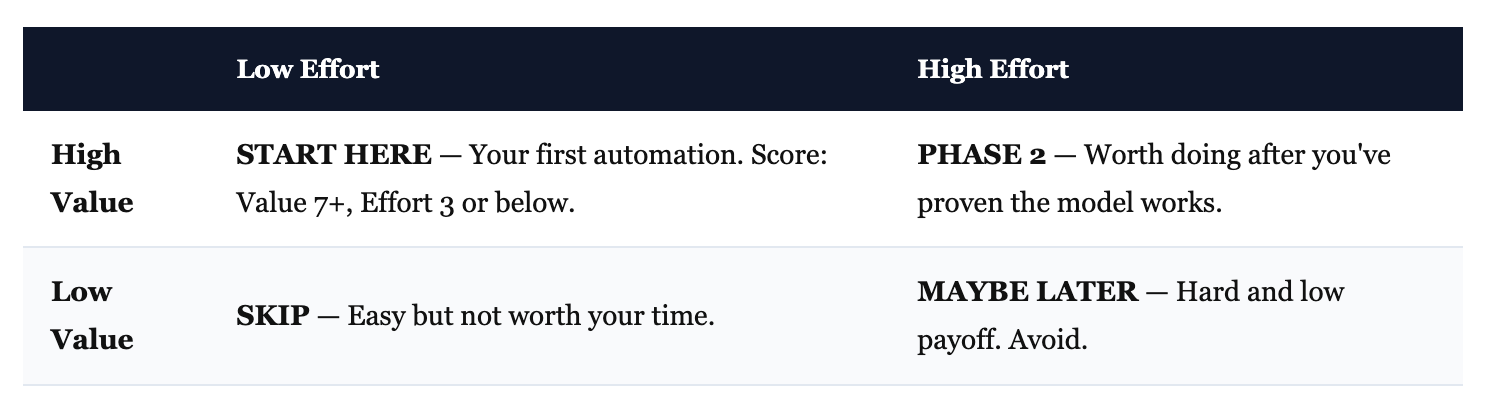
For each workflow, score two things: Value (1-10) — how much time or money does this save? And Effort (1-10) — how hard is it to build and maintain?
Test the hardest step first
Nick’s smartest move wasn’t the framework — it was his execution order. For his distributorship client, the first thing he tested was: can OpenClaw even navigate that legacy website and download one report? Not the full pipeline. Just the riskiest part.
It worked. So he built the rest. If it hadn’t, he would’ve saved himself days of wasted work.
Don’t scope a full automation on day one. Build the skateboard. If the hardest step works, everything else is just connecting pieces.
Map the workflow, then build it
Nick maps automations in Figma before writing code. You don’t need Figma — Mermaid diagrams, Excalidraw, or a bulleted list work fine. The point is: know the full trigger-to-output flow before you touch OpenClaw.
One useful trick from the podcast: record your client calls, feed the transcript to Claude, and ask it to extract the step-by-step workflow. Nick does this with Gemini for Google Meet. It turns a vague conversation into a concrete build plan in minutes.
The Upwork Arbitrage
This was the most tactical part of the podcast, and it’s the fastest way to your first dollar.
How Nick did it
Nick spawned multiple OpenClaw sub-agents and sent them to Upwork. Their job: find RPA and automation jobs in the $500 to $20,000 range, analyze the requirements, and build mini demos for each one.
Then he picked the best opportunity, attached the working demo to his proposal, and applied.
Think about what that means. Most freelancers on Upwork write a proposal describing what they’d build. Nick showed up with a prototype already working. That’s a different game.
Why this works
You’re not competing on price. You’re competing on proof.
When a client posts “I need a desktop automation for my PDF business” with a $1,000 budget, most freelancers respond with a paragraph describing what they’d build. You respond with a 30-second video of OpenClaw already navigating their type of workflow. That’s a fundamentally different proposal.
Here’s a prompt structure you can adapt for finding and pitching these jobs:
I want you to search Upwork for jobs related to:
- Robotic process automation (RPA)
- Desktop automation
- Business workflow automation
- Data entry automation
- Legacy software automation

Filter for budgets between $500 and $10,000.

For each relevant job:
1. Summarize what they need
2. Identify which parts OpenClaw could handle
3. Draft a 3-sentence proposal that mentions
   a working demo

Present the top 5 opportunities ranked by
fit and budget.
One thing Nick didn’t say explicitly, but I think matters: Upwork is your training ground, not your end game. It’s perfect for building case studies and getting paid while you learn what businesses actually need. But the real money is in recurring clients paying monthly for ongoing automation management. Your first Upwork project is your first case study for direct outreach.
Sub-Agents — Your Leverage Play
One OpenClaw is a personal assistant. Multiple coordinated OpenClaws is an automation agency.
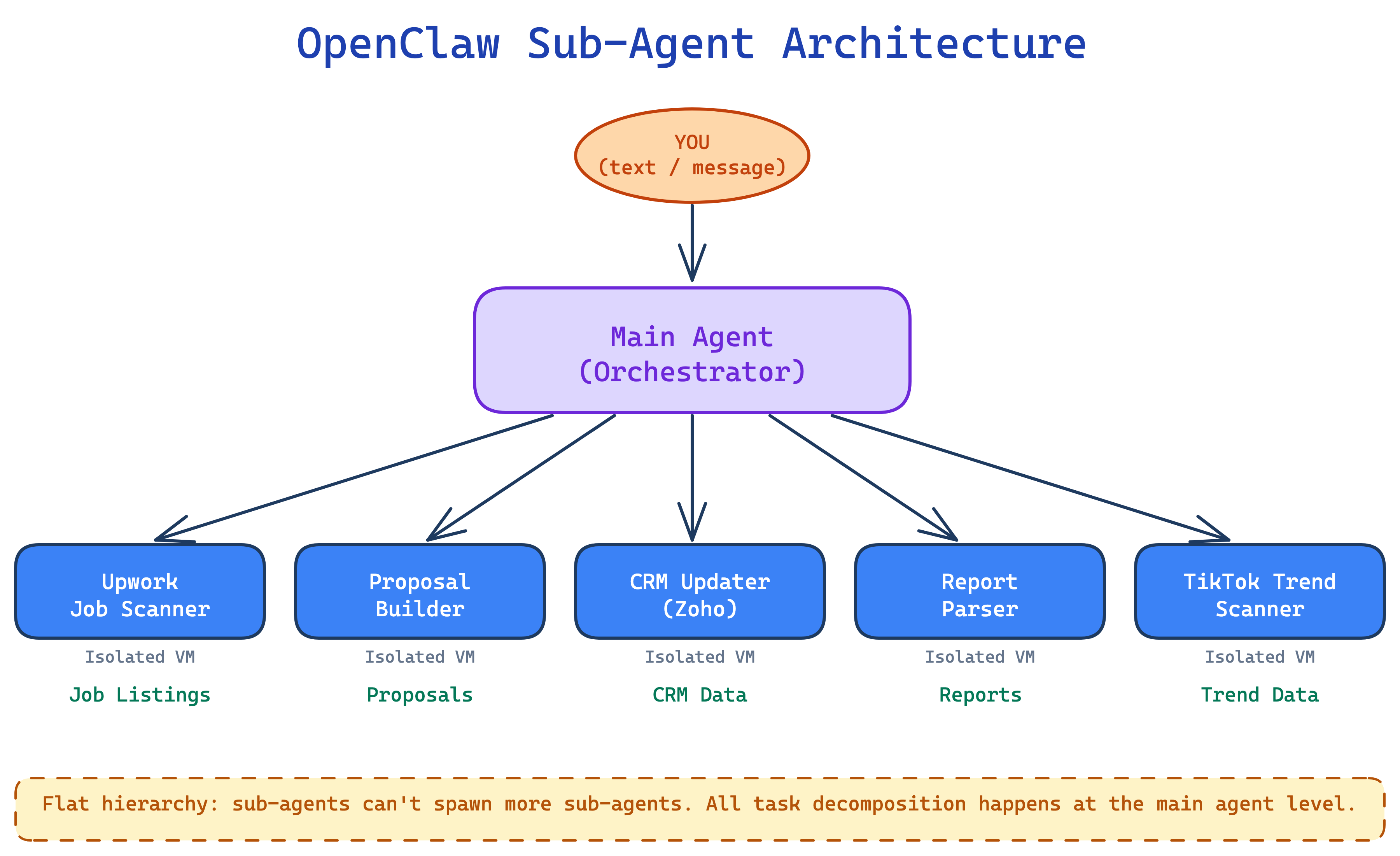
Main agent = manager, sub-agents = workers
OpenClaw can spawn up to eight sub-agents. Each gets its own isolated session (and optionally its own computer if you’re using a VM platform like Orgo). The main agent
stays free to orchestrate, check quality, and respond to you. The sub-agents do the work.
Nick’s analogy: your main agent is holding a cup of hot coffee. If you ask it to move a desk, it can’t — it’s busy. Sub-agents are extra hands. They do the heavy lifting so your main agent stays available.
The hierarchy is flat. Your main agent can spawn sub-agents, but those sub-agents can’t delegate further. All task decomposition happens at the top.
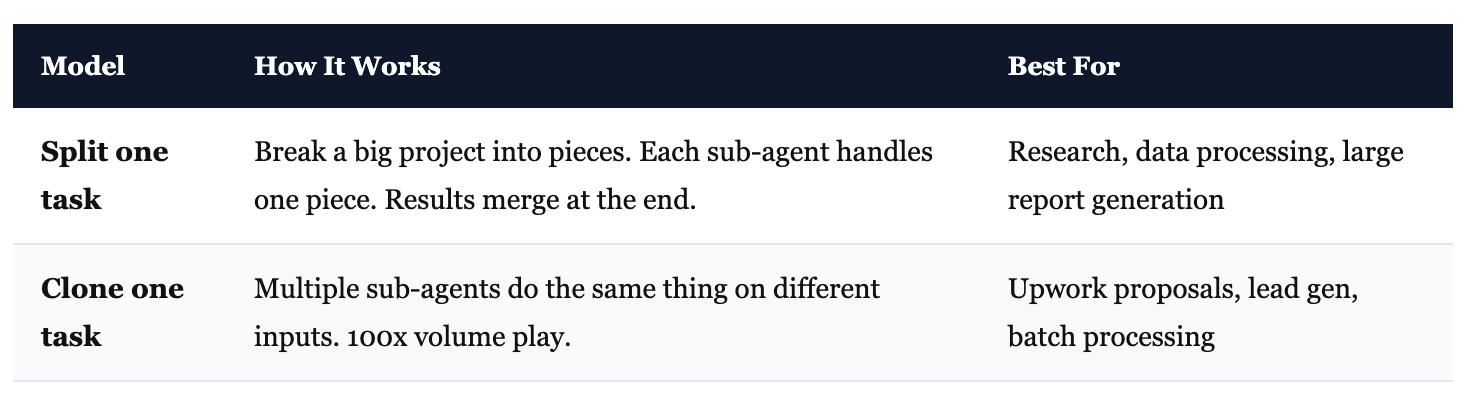
Two ways to parallelize
Nick showed two models. Both are useful for different situations.
Skills as deployable workers
Here’s where it gets interesting for building a business. Instead of giving OpenClaw generic instructions every time, you create skills — specialized instruction sets with code that your main agent can call on demand.
So your “TikTok trend scanner” skill, your “Upwork proposal builder” skill, your “Zoho CRM updater” skill — they’re all separate, tested, refined. The main agent picks the right one based on context.
Nick demonstrated this live on the podcast: he took an idea from Greg’s Idea Browser, turned it into a skill, gave it to OpenClaw, and had it running in about 10 minutes. Rough? Yes. But the speed of going from idea to working prototype is real.
This is also where your business becomes defensible. Each skill you build is an asset. Over time, you accumulate a library of tested, refined automation skills for a specific vertical. New client in the same industry? You’re not starting from scratch. You’re plugging in proven components.
Where Nick glosses over the hard part
Nick made the live demo look easy. Paste an idea, ask OpenClaw to build a skill, running in 10 minutes. But he also admitted: “it needs a little debugging, as to be expected.”
That undersells it. The debugging is the job. Getting a prototype to work once in a demo is the easy part. Getting it to work reliably, every day, on messy real-world data, without babysitting — that’s where most OpenClaw automations fall apart. HN threads are full of people whose agents worked great for three days, then hit an edge case and silently broke.
There’s also a deeper issue: AI outputs aren’t deterministic. The same workflow can produce slightly different results each time. For business-critical tasks — uploading data to a client’s CRM, generating invoices, processing orders — that’s a real problem. Traditional software with guardrails exists for a reason.
If you’re going to sell this as a service, you need to plan for monitoring, error handling, and maintenance. Not just the initial build. That’s the difference between a demo and a business.
From Freelancer to Vertical SaaS
Nick and Greg painted a bigger picture toward the end of the podcast. And I think they’re right about where this goes.
“Agents are the new SaaS”
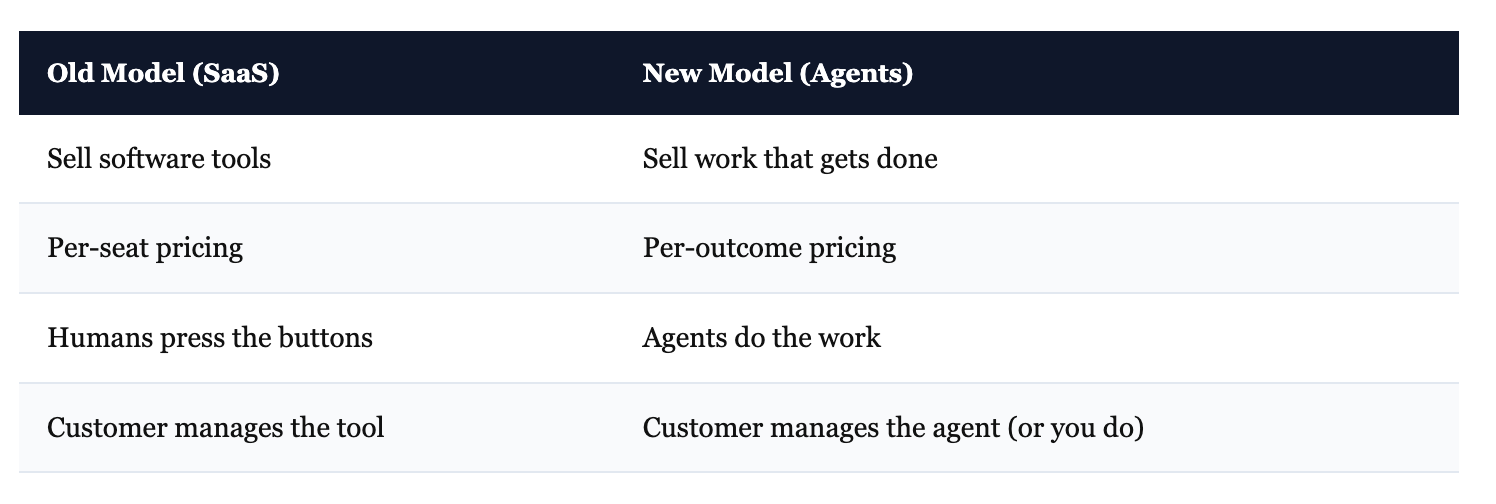
Greg said it directly: “In the past, we created software and sold it to businesses. They’d have people press the buttons. Now you’re not going to create software and invite them to it. You’re going to create agents and invite them to the agents.”
That’s the shift. You’re not selling a tool. You’re selling work that gets done.
Deloitte predicts up to 75% of companies will invest in agentic AI in 2026. The pricing model is changing too — from per-seat (pay for each human using the software) to per-outcome (pay for each task completed, each lead generated, each report processed).
Pick a vertical
Greg’s advice was specific: don’t try to automate everything for everyone. Pick a vertical. Real estate agents. Manufacturing. Distributorships. E-commerce operations.
Your unfair advantage doesn’t have to be 20 years of experience. Maybe your mom was a real estate agent and you understand the customer. Maybe you worked in logistics for two years and know the pain points. That domain knowledge is your edge — because the technical part (building the automation) keeps getting easier.
The workspace model
Nick described a near-future setup: you build out automation workflows for an entire vertical. When a new client in that industry signs up, you invite them into a workspace where AI employees are already configured and ready to go.
“You feel like you just hired not a person, but a team,” Nick said. That’s the product.
This is the 6-12 month play, not the day-one play. And I think Nick moved past this too quickly on the podcast. You don’t build a vertical SaaS by deciding to build a vertical SaaS. You build it by doing enough client work in one industry that you start noticing patterns — every client needs X, Y, and Z automated. That’s when you productize it. The verticalization emerges from the work, not from a business plan.
What I’d Add to Nick’s Playbook
Nick’s approach is solid. But there are a few things he either glossed over or didn’t cover that I think matter if you’re serious about this.
Use OpenClaw as the trigger, not the builder
This is my biggest divergence from what Nick showed — and it connects to a funny disconnect in the podcast itself. Nick demos a TikTok scraper (flashy, fun) but then tells you to go after manufacturing and distributorships (boring, profitable). The demo and the advice don’t match. For the boring stuff that actually pays, you need reliable code, not an AI clicking around a browser.
For the actual automation — the Python scripts, API calls, data processing — Claude Code builds more reliable pipelines. It writes real code, tests it, and iterates until it works. OpenClaw is best as the orchestrator: it monitors for events (a new email, a cron schedule, a message), then triggers the robust automation underneath.
OpenClaw handles the “when.” Claude Code handles the “how.” That split gives you the 24/7 monitoring of OpenClaw with the code quality of a proper development tool.
Security will make or break your client relationships
341 malicious skills distributing malware. 7.1% of published skills leaking credentials. 40,000+ exposed instances found by security researchers. This isn’t hypothetical risk — it’s already happening.
If you’re deploying this for clients:
Run OpenClaw in Docker containers (never on bare metal with full system access)
Scope permissions to exactly what the workflow needs
Audit every third-party skill before installing
Never hardcode API keys (Nick showed his keys live on the podcast — he said he’d delete them, but that’s the wrong instinct entirely. Use environment variables. Always.)
One security incident with a client’s data and your reputation is done. This isn’t a “nice to have” section. It’s the difference between a side project and a real business.
Know your margins
Build cost tracking into every automation from day one. Know what each workflow costs per run. Set budget alerts.
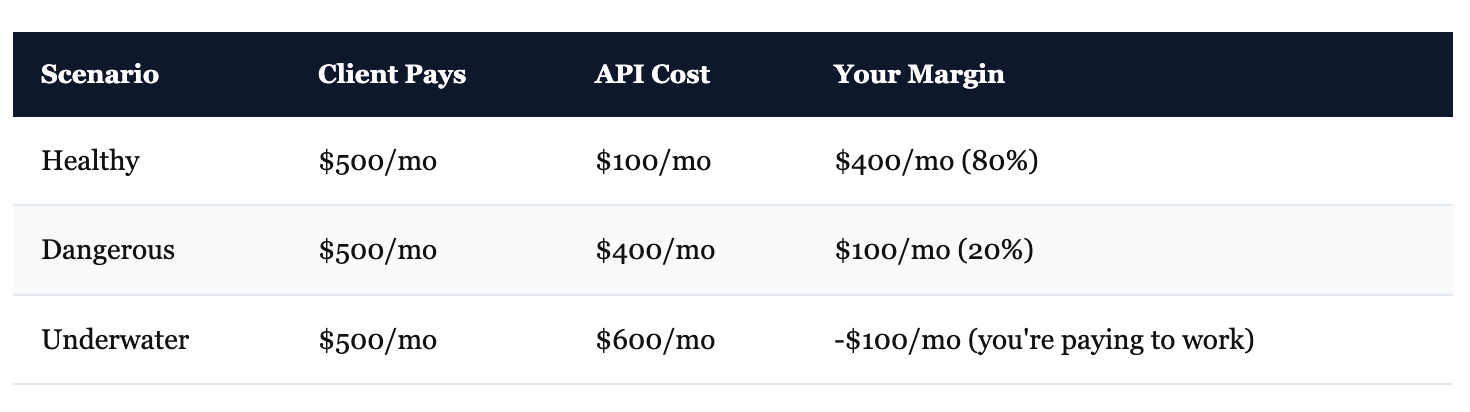
Nick didn’t talk about this on the podcast, and I think it’s because he hasn’t hit the scale where it bites yet. You will.
Start in boring industries
Healthcare, finance, legal — they have compliance requirements that multiply the complexity of every automation. Start where the stakes are lower: manufacturing, e-commerce, content production, professional services, distributorships. Get your workflows reliable first. Then expand into regulated verticals when you can afford the extra work.
Start This Week
The gap between “people who can set this up” and “businesses that need it” won’t last forever. Every week, more tutorials get published. More people figure it out. If you’re reading this, you’re early — but early doesn’t mean anything unless you move.
Here’s the play:
Pick one workflow. Something you’ve done yourself, or something a business you know does manually. The more boring, the better.
Score it. Value vs. effort. If it’s not high value and low effort, pick another one.
Test the hardest step. Can OpenClaw handle the riskiest part of the workflow? If yes, build the rest. If no, you just saved yourself a week.
Charge for it. Deploy it for one client (or yourself). Use it as your first case study.
Nick built a working prototype live on a podcast in 10 minutes. It needed debugging. It wasn’t polished. But it was real. That’s worth more than a perfect pitch deck — because the business owners who will pay you don’t care about your plan. They care about seeing their painful, manual process disappear.
Go build the boring thing.
Great article and framework. Thanks for sharing it Daniil!
I've been using OpenClaw, apparently I've not been thinking about making money yet, this gives me some great ideas :)